We will never let you down!

The Story Behind the CRM

Built in the Trenches. Designed for the Solo Recruiter.

I didn’t start coding because I loved software. I started because I was drowning in it.

For years, my recruitment process was a patchwork of Excel sheets, Outlook inboxes, LinkedIn tabs, and Word templates.

I spent more time copying data, chasing follow-ups, and formatting documents than actually talking to candidates or closing clients.

I paid for SaaS platforms that promised automation but delivered complexity.

I worried about my candidate database living on someone else’s servers.

And worst of all, I knew I was leaving placements on the table simply because the admin work was slowing me down.

The Turning Point

So I did what recruiters do best: I took control of the process.

I stopped looking for a tool that almost fit my workflow and built one that exactly matches it.

What I Built

The result is a desktop-first, local-AI Recruitment CRM.
No monthly cloud subscriptions. No data leaving your machine. No bloated features you’ll never use. Just a clean, powerful system that handles the repetition so you can focus on relationships, judgment, and placements.
✅ 1-Click Sourcing → Import profiles directly from LinkedIn
✅ Local-First AI Matching → Ollama + BGE-M3 run on your hardware. Zero cloud dependency.
✅ Quality-Gated Pipeline → Move candidates only after adding real evaluation notes
✅ Auto-Generated Candidate Profiles → Stage 4 triggers a polished, client-ready email with AI summaries & attachments
✅ Smart Email Campaigns → Drip sequences with AI response interpretation (Manual / Semi / Full Auto)
✅ Offline Invoicing & Revenue Tracking → From placement to payment, all logged locally

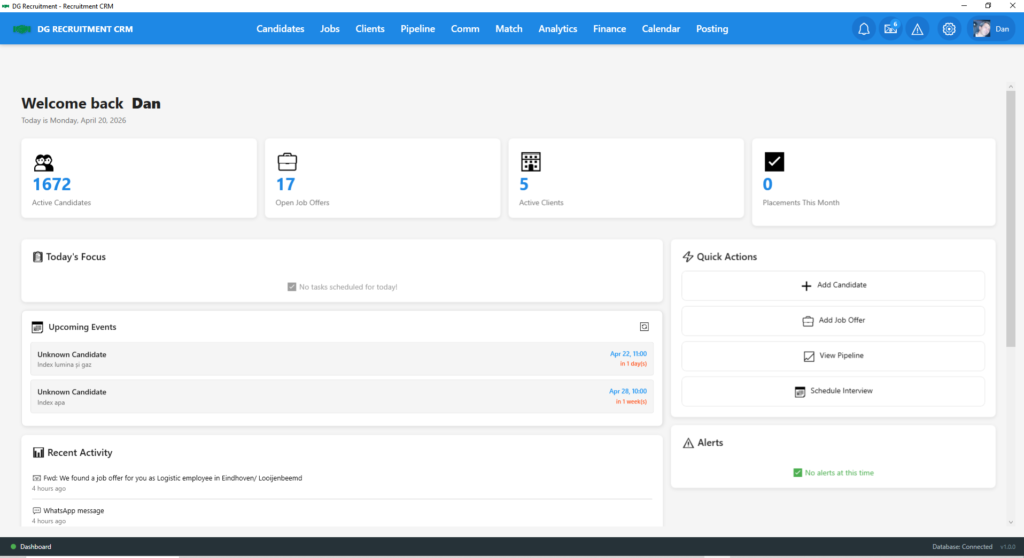
recruitment crm

Proof It Works

I didn’t launch this in a vacuum.
I tested it on my own desk, with my own clients.
Last month, I imported a candidate’s profile with one click. The local AI matched him at 89% against an active job.
I moved him through quality-gated stages, added interview notes, and at Stage 4, the system auto-generated a professional candidate presentation email.
The client called the next day. The candidate was hired on the spot.
Time saved on admin: ~80%.
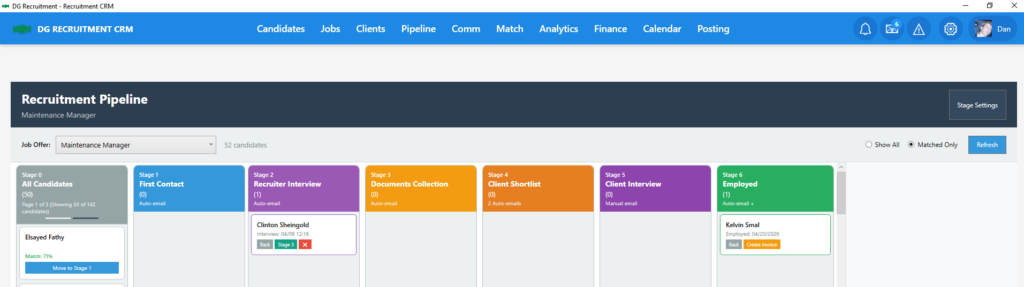
recruitment pipeline

The Philosophy

This isn’t about replacing recruiters with AI. It’s about amplifying them.
You bring the intuition, the network, and the deal-closing skill.
The software handles the parsing, the matching, the follow-ups, and the paperwork.
Your data stays yours.
Your workflow stays yours.
Your margins stay yours.

Join the Early Access

I’m opening a limited number of spots to independent recruiters who are done with spreadsheet fatigue and cloud risks.


Try it free for 30 days. If it doesn’t save you hours every week, walk away. If it does, you’ll never look back.

Check the System Requirements & Pre-requisites first!

It will let you know what you need for the program to run smoothly on your computer.

To ensure optimal performance, stability, and the full functionality of the Recruitment CRM AI features, please verify that your computer meets the following specifications before installation.

  1. Hardware Specifications & Installation
    • Operating System:Windows 10 or Windows 11 (64-bit).
    • Processor (CPU):AMD Ryzen 3 2200U / Intel Core i5 (or equivalent) or higher.
    • Memory (RAM):8 GB Minimum (16 GB Recommended).
    • Storage & Installation:
  • Free Space:At least 60 GB of free disk space is required.
  • Installation Path:You may install the main database and assets on an Internal Drive (HDD/SSD) or a High-Speed External Drive.
  • Performance Tip:For maximum stability, a separate physical drive (other than C:) is highly recommended.
  1. Mandatory Local AI Engine: Ollama
    This CRM uses Ollama to run advanced Large Language Models (LLMs) locally. This architecture guarantees that your sensitive recruitment data never leaves your computer.
    Pre-installation steps for Ollama:
    1. Download:Visit ollama.com and download the Windows installer.
    2. Install:Follow the standard installation wizard.
    3. Model Setup:Open your terminal (Command Prompt or PowerShell) and run the following commands:
  • ollama run llama3.2:3b(Primary engine for parsing and analysis).
  • ollama pull bge-m3:latest(Secondary engine for high-precision candidate matching).


  1. Browser & Connectivity
    • Web Browser:Google Chrome, Microsoft Edge, or Mozilla Firefox (Required for the Browser Extension/LinkedIn data extraction). Please ensure you install the version of the extension specific to your browser.
    • Internet Access:Required for Market Intelligence web-scraping, Email Tracking, and external API parsing levels.
    • API Keys:You will need to input your own API keys for certain external parsing levels. Detailed instructions are provided in the Installation Guide.


  1. Data Privacy & Automated Backup
  • Local-First Architecture:Your database, candidate profiles, and AI-generated notes are stored exclusively on your physical hardware. The developer has zero access to your data.
  • Automated Data Protection:The CRM includes a built-in automated daily backup system.
  • Retention Policy:The system automatically preserves the last 30 daily versions of your database.
  • User Responsibility:As the sole Data Controller, you are responsible for ensuring your physical drive is healthy. We recommend occasionally copying these backups to an external cloud or physical drive for extra redundancy.
  1. Licensing & Machine Activation
  • Device Lock:Each license key is strictly tied to a unique Machine ID.
  • Usage:One license allows the program to run on one specific computer. To use the CRM on multiple workstations, separate licenses are required.

By installing and using this Recruitment CRM, you agree to the following terms and conditions. Please read them carefully before proceeding with the installation.

  1. License Grant & Activation
    • Machine ID Lock:Each license is strictly tied to a unique Machine ID and the registered Email Address provided at the time of purchase.
    • Single Workstation:One license grants the right to use the software on one (1) specific computer. To use the CRM on multiple workstations (e.g., Office and Home), separate licenses are required.
    • Stored License Data:To manage your activation and prevent unauthorized use, the system securely stores: User Name, Email, License Key, Machine ID, and License Validity Period.
  1. Browser Extension & Data Capture (LinkedIn)
  • Manual Data Capture:The Browser Extension acts as a digital assistant that allows you to capture publicly visible professional information from a profile you are currently viewing. It does not perform automated background scraping.
  • One-Click Import:When triggered, the extension replicates key professional details (name, role, experience) and transfers them to your local CRM to create a candidate record.
  • Compliance & Responsibility:You are solely responsible for complying with the Terms of Service of third-party platforms (e.g., LinkedIn). The developer is not liable for any account restrictions, warnings, or suspensions resulting from the frequency or manner in which you choose to capture profile data.
  1. AI Performance & Human Oversight
  • Consultative Results:All AI-generated outputs, including Candidate MatchingMarket Intelligence, and Drafted Emails, are provided for informational and consultative purposes only.
  • Potential for Errors:You acknowledge that Large Language Models (LLMs) can produce inaccuracies.
  • Customizable Matching Logic:The software provides a flexible Matching Engine with multiple adjustable parameters (Job Title, Skills, Keywords, LLM Analysis, and Nationality). You are encouraged to calibrate these weights to align with your specific recruitment style.
  • Final Decision:The final decision regarding candidate quality, selection, and hiring remains 100% with the human recruiter. The software is a decision-support tool, not a replacement for professional judgment.
  1. No Warranty (“AS-IS”) & Maintenance
  • Current State:The software is provided “AS-IS” and “AS-AVAILABLE.” The developer cannot guarantee uninterrupted functionality if external platforms (LinkedIn, Google, WhatsApp, etc.) modify their source code or API protocols.
  • Technical Support & Updates:In the event of such external changes, the developer may provide updates to restore functionality. Access to these updates and priority technical assistance is strictly reserved for users with an active Customer Support & Updates subscription.
  • Service Limitations:Users without an active support subscription acknowledge that certain features may become legacy or non-functional over time due to external platform evolutions.
  1. Data Ownership & GDPR Compliance
  • Local Management:You own your data. You are the sole Data Controller and are responsible for the accuracy and legality of the records stored within your local database.
  • Automated Compliance Tools:The CRM includes an Auto-Update & Retention engine that monitors candidate activity and triggers email campaigns to verify consent from inactive profiles.
  • Assisted Deletion:Based on candidate responses, the system will flag profiles as “To be Deleted.” To prevent accidental data loss, the software does not delete records automatically. You must review the flagged list and trigger the “Delete All” command manually.
  • Physical Erasure:Once the deletion command is confirmed, all associated files (CVs, notes, documents) are permanently and physically erased from your local storage.

This Privacy Policy explains how the Recruitment CRM handles your data. Built with a “Privacy-by-Design” philosophy, the software ensures that you maintain 100% ownership and control over your recruitment database.

  1. Data Sovereignty & Zero Cloud Transfer
    • Local Storage:All candidate profiles, resumes, notes, and task histories are stored exclusively on your local hardware.
    • No Automated Uploads:The software does not perform any background data transfers to external servers.
    • User-Initiated Sharing:Data transfer only occurs through your express actions, such as manually sending an email or exporting a report. You are the only person who decides if and when data leaves your computer.
  1. Third-Party API Processing & Cost Control
  • Built for Free Resources:The CRM is engineered to deliver high-quality results using free API tiers. Users can operate the software effectively without incurring additional monthly costs.
  • User-Owned Accounts:All external services are linked to your personal API accounts. You maintain full control over which providers you use.
  • Optional Upgrades:While the program runs optimally with free resources, you have the option to link paid API keys if you desire enhanced performance or higher processing volumes. This remains entirely at your discretion.
  • Transit-Only Processing:Data sent to external APIs is processed “in-memory” and is not stored permanently on external servers.
  1. No Telemetry or Usage Tracking
  • Complete Privacy:We do not collect telemetry, usage statistics, or “phone-home” data. We do not track how many candidates you have, which industries you target, or how often you use the software.
  • Independent Operation:Once activated, the software functions as a standalone tool on your workstation.
  1. Local AI & LLM Security (Ollama)
  • Local Matching:All candidate-to-job matching and qualitative analysis are performed locally via Ollama.
  • Internal Data Isolation:Sensitive notes and matching results remain within the CRM’s encrypted local database. They are not used to “train” the local LLM, and they are never transmitted to external AI providers.
  • Air-Gapped Potential:Your core recruitment intelligence (Matching & Notes) remains secure even if your computer is offline.
  1. Automated Data Hygiene
  • Consent Management:The software proactively helps you maintain a “clean” database by reaching out to inactive candidates on your behalf.
  • Physical Erasure:Unlike cloud systems that may keep “shadow copies,” our deletion process ensures that when you confirm a deletion, the physical files are removed from your hard drive immediately.

Recruitment CRM – User Manual

Built by a Recruiter, for Recruitors
Local-First AI • Offline Ready • GDPR Compliant


© 2026 Dan Georgescu | Recruitment CRM

📘 Table of Contents

🟢 Chapter 1: Welcome to the New Era of Solo Recruiting

  1.1 The Story Behind the Program

  1.2 Case Study: Fast Placement Using the CRM

  1.3 The ‘Local-First AI’ Philosophy

🟢 Chapter 2: Preparing Your ‘Command Center’ (Setup)

  2.1 System Requirements (Hardware & Storage)

  2.2 Installing the ‘Brain’ (Ollama & Llama/BGE Models)

  2.3 Configuring Integrations (Google Calendar, Email, API Keys)

  2.4 Installing Browser Extensions (Chrome/Firefox)

🟢 Chapter 3: Sourcing & Candidate Management

  3.1 Profile Extraction Directly from LinkedIn

  3.2 Pipeline Organization (Sourcing → Interview → Hired)

  3.3 Document Management & CV Parsing

🟢 Chapter 4: The Magic of Matching & AI Intelligence

  4.1 How Embedding Models Work (Semantic Memory)

  4.2 Configuring Matching Weights & Presets

  4.3 Generating Market Reports (Market Intelligence)

🟢 Chapter 5: Automations & ‘Endurance’ (Auto-Pilot)

  5.1 Automatic Client Prospecting (Email Campaigns)

  5.2 Database Hygiene (GDPR & Auto-Cleanup)

  5.3 Email Tracking & Multi-Channel Communication

🟢 Chapter 6: Troubleshooting & Support

  6.1 Resolving Common Errors

  6.2 Updates & Technical Support

🟢 Chapter 1: Welcome to the New Era of Solo Recruiting

1.1 The Story Behind the Program

Recruitment CRM was born from real-world frustration. As an independent recruiter, I spent years manually copying data between Excel, Outlook, LinkedIn, and Word—losing time, making errors, and missing opportunities. This program was built to eliminate that chaos. It’s not just software; it’s a digital partner that handles the administrative burden so you can focus on what matters: connecting great talent with great opportunities.

1.2 Case Study: How I Made a Fast Placement Using the CRM

The Challenge: Find a qualified Maintenance Manager for a client with urgent needs.

The Process:

  • Sourcing: Used the browser extension to import the candidate’s LinkedIn profile with one click.
  • Matching: AI (BGE-M3 + Ollama) instantly scored the profile at 89% match against the job requirements.
  • Pipeline Management: Moved the candidate through quality-gated stages, adding interview notes at each step.
  • Candidate Profile Generation: At Stage 4, the CRM auto-generated a professional presentation email with AI-summarized insights, attached documents, and my signature.
  • Result: The client received the profile, called the candidate the next day, and hired them on the spot.

Time Saved: ~80% compared to manual processes.

1.3 The “Local-First AI” Philosophy

Your data never leaves your computer unless you choose to send it.

  • ✅ All candidate profiles, notes, and documents are stored locally on your hardware.
  • ✅ AI processing runs via Ollama on your machine—no cloud APIs required for core matching.
  • ✅ You control backups, retention, and GDPR compliance.
  • ✅ No third-party access to your candidate database or client contracts.

Your intelligence. Your data. Your control.

🟢 Chapter 2: Preparing Your “Command Center” (Setup)

2.1 System Requirements (Hardware & Storage)

Component

Minimum

Recommended

OS

Windows 10

Windows 10/11

RAM

16 GB

32 GB

Storage

100 GB free SSD

500 GB+ NVMe SSD

CPU

Quad-core

6+ core modern processor

GPU

Integrated

Dedicated GPU (for faster AI inference)


💡 Pro Tip: Install the CRM on a secondary drive (D: or E:) to avoid Windows permission issues with the local database.

2.2 Installing the “Brain” (Ollama & Llama/BGE Models)

Step 1: Install Ollama

  • Go to ollama.com and download the Windows installer.
  • Run the .exe file and follow the prompts.
  • Verify the Ollama icon appears in your system tray.

Step 2: Download Required Models

  • Open PowerShell or Command Prompt.
  • Run: ollama run llama3.2:3b
  • Run: ollama pull bge-m3:latest
  • Wait for each download to complete before proceeding.

2.3 Configuring Integrations (Google Calendar, Email, API Keys)

Pre-Installation Checklist: Create a “CRM Credentials” Folder

Before launching the CRM, create a folder on your desktop named CRM Credentials and save these files:

Service

What to Save

Purpose

Cerebras

API Key (.txt)

Fast AI parsing fallback

Groq

API Key (.txt)

High-speed inference backup

Tavily

API Key (.txt)

Web search & market intelligence

Google Calendar

Client ID + Client Secret

Bidirectional calendar sync

Email (Gmail)

16-character App Password

Secure IMAP/SMTP authentication

Email Tracker

URL to track.php on your server

Email open/click tracking

Branding

Logo (PNG, transparent)

Professional PDF/email templates


⚠️ Important: When Google shows “Unverified app”, click Advanced → Go to [App Name] (unsafe). This is normal for private integrations.

Email Connection (IMAP/SMTP):

Provider

IMAP Server

SMTP Server

Port (SSL)

Gmail

imap.gmail.com

smtp.gmail.com

993 / 465

Outlook

outlook.office365.com

smtp.office365.com

993 / 587

Custom

From your host

From your host

As specified


💡 Pro Tip: Gmail Users: You MUST use an App Password (not your regular password). Enable 2-Step Verification first.

2.4 Installing Browser Extensions (Chrome/Firefox)

  • Open Chrome/Firefox and go to the CRM’s extension download page.
  • Click Add to Chrome / Add to Firefox and confirm installation.
  • Pin the extension icon to your toolbar for easy access.

💡 Pro Tip: Verification: When you visit a LinkedIn profile page, a blue “Export to CRM” button should appear on the right side of the screen.

🟢 Chapter 3: Sourcing & Candidate Management

3.1 Profile Extraction Directly from LinkedIn

How It Works:

  • Navigate to any LinkedIn profile.
  • Click the “Export to CRM” button (appears only on valid profile pages).
  • The extension instantly extracts name, title, location, experience, and skills, then sends data to your local CRM database.

What Happens Next:

  • Candidate appears in Stage 0: All Candidates within seconds.
  • AI generates keywords and calculates matching scores against active jobs.
  • Profile is ready for review, notes, or pipeline movement.

3.2 Pipeline Organization (Sourcing → Interview → Hired)

The CRM uses a 7-stage visual pipeline (Kanban-style):

Stage

Name

Purpose

0

All Candidates

New imports; review & score

1

First Contact

Initial outreach completed

2

Interview Scheduled

Calendar sync active

3

Documents Collection

CV, references, certificates gathered

4

Client Presentation

Profile sent to employer

5

Final Interview / Offer

Negotiation phase

6

Employed

Placement confirmed → Invoice ready


Quality Gates: To move a candidate from Stage 0 → 1, you must add a “First Evaluation Note”. This ensures every candidate receives human review before advancing.

3.3 Document Management & CV Parsing

  • Drag & drop CVs, certificates, or portfolios into a candidate’s profile.
  • Mark documents as “Visible to Client” or “Internal Only”.
  • AI Parsing: Extracts skills, experience, education, and keywords automatically (supports multiple languages via BGE-M3).
  • Document Status Tracking: ✅ Complete | ⏳ Pending | ❌ Missing

🟢 Chapter 4: The Magic of Matching & AI Intelligence

4.1 How Embedding Models Work (Semantic Memory)

What is an Embedding Model? It converts text (CVs, job descriptions) into mathematical vectors that capture meaning, not just keywords.

Why BGE-M3?

  • ✅ Multilingual: Understands English, Romanian, and other languages.
  • ✅ Semantic: Knows “Software Engineer” ≈ “Developer” ≈ “Programmer”.
  • ✅ Fast & Local: Runs on your machine via Ollama—no cloud dependency.

Result: The CRM matches candidates based on intent and context, not just exact keyword matches.

4.2 Configuring Matching Weights (Title vs. Skills vs. AI)

Access: Settings → Matching → Global Rules

🔹 Tab 1: Global Rules

Setting

Description

Recommended

Embedding Model

AI model for semantic analysis

bge-m3:latest

Matching Threshold

Minimum score to show candidates

50% (adjustable)

Continuous Matching

Auto-match new candidates/jobs in background

Enabled

Vector Status

Shows processed candidates/jobs

Monitor here


🔹 Tab 2: Scoring Weights (Must total 100%)

Weight

Purpose

When to Increase

Job Title Match

Importance of exact/similar titles

Executive roles

Skills/Keywords

Technical competencies

IT, engineering roles

Years of Experience

Seniority alignment

Leadership positions

AI Similarity (Vector)

Semantic/contextual match

Creative, hybrid, or vague roles


🎯 Quick Presets:

Profile

Title

Skills

Experience

AI Vector

Best For

Standard

40%

35%

15%

10%

General office roles

Technical Hard

20%

60%

10%

10%

Developers, engineers

Explorer

10%

10%

10%

70%

Finding hidden talent


4.3 Generating Market Reports (Market Intelligence in 5 Seconds)

How to Generate:

  • Go to Reports → Market Intelligence.
  • Select job title, location, and industry filters.
  • Click Generate Report.

What You Get:

  • 📊 Salary benchmarks (based on parsed job postings)
  • 🔍 Skill demand trends
  • 🌍 Geographic availability heatmaps
  • 📈 Competition analysis (how many similar roles are active)

🟢 Chapter 5: Automations & “Endurance” (Auto-Pilot)

5.1 Automatic Prospecting of New Clients

Note: The CRM does not scrape the web or use paid APIs to find prospects. Instead, it helps you convert prospects you identify via tools like Lusha, Apollo, or LinkedIn Sales Navigator.

Workflow:

  • Export prospect list from your sourcing tool (CSV).
  • Import into CRM → Client Prospecting Pipeline.
  • Assign to an Email Campaign Sequence.

Campaign Features:

  • ✅ Multi-step drip sequences (Day 0, Day 3, Day 7…)
  • ✅ Dynamic variables: {FirstName}, {Company}, {JobTitle}
  • ✅ Template library + custom template builder
  • ✅ Open/click tracking via track.php

5.2 Database Hygiene (GDPR & Auto-Cleanup)

Auto-Cleanup Mode:

  • Scans for inactive candidates (e.g., no contact in 12+ months).
  • Triggers GDPR-compliant re-consent email campaigns.
  • AI interprets responses: “Keep me” → Update consent date | “Remove me” → Auto-archive with audit log.

Backup System:

  • Daily automatic backups to your configured folder.
  • Retains last 30 days of backups.
  • Manual “Backup Now” button before major changes.

💡 Pro Tip: All data stays on your machine. Export/delete tools help you comply with data subject requests.

5.3 Email Tracking & Communication via WhatsApp/Ringover

Email Tracking:

  • Upload track.php to your web server.
  • Enter the URL in Settings → Email → Tracking.
  • See real-time opens/clicks in candidate profiles.

Smart Response Modes for Campaigns:

Mode

How It Works

Your Role

🟢 Manual

Notify you of replies

You read & respond manually

🟡 Semi-Auto

AI detects negative replies (“Not interested”)

Auto-unsubscribe; you handle positives

🔴 Full Auto (AI)

Ollama analyzes intent & drafts replies

You review & approve before sending


🟢 Chapter 6: Troubleshooting & Support

6.1 Resolving Common Errors

Issue

Likely Cause

Solution

❌ “Ollama not found”

Ollama not running

Launch Ollama; check system tray icon

❌ “API quota exceeded”

Free tier limit reached

Wait for reset or upgrade plan

❌ “Invalid Client/Secret”

Google credentials copied incorrectly

Re-copy from Google Console; test connection first

❌ “Access denied” in browser

Logged in with wrong Google account

Sign out of all accounts; use the Test User email

❌ No “Export to CRM” button on LinkedIn

Extension not active or on non-profile page

Ensure you’re on a profile URL; reload page

❌ Matching scores not updating

Embeddings not generated

Click Generate Missing in Matching Settings

❌ Email not sending

IMAP/SMTP settings incorrect

Use App Password for Gmail; verify ports/SSL


6.2 Updates & Technical Support

Keeping Your CRM Updated:

  • The program checks for updates on launch (configurable).
  • Always back up your database before updating.
  • Release notes appear in the Help → What’s New menu.

Getting Help:

  • In-App Help: Click the ? icon in any window to open context-specific HTML guides (17 built-in help files).
  • Troubleshooting Guide: Access via Help → Troubleshooting.
  • Contact Support: 📧 support@yourcrm.com | 💬 Include: Machine ID, CRM version, and steps to reproduce.

🎯 Final Thought

This CRM doesn’t replace your expertise—it amplifies it. You bring the relationships, judgment, and intuition. The software handles the repetition, organization, and intelligence. Together, you recruit faster, smarter, and with more impact.

— Dan Georgescu, Creator of Recruitment CRM

Start Your Free Trial

Enter your details below and receive your license key and download link instantly by email.

Join the Early Access today! Get your 30 days trial license in an instant!

Your email is used only to deliver your license. No spam, no newsletters.

Seasonal Greetings from DG Recruitment!!!

To all of you, we wish you a Merry Christmas and a Happy, Prosperous and Healthy New Year!Just don't forget to contact us for any enquiry!!!