
Recruitment CRM
by Dan Georgescu, a Solo Recruiter
Built by me as I needed it for my work
The reason behind it
I have been a solo recruiter for about 8 years, working remotely only.
So, I needed a program to help me in my work, the way I see my work, not decide for me, but help me move faster and better.
Before deciding to build this program, I’ve tried a lot of CRMs and ATSs from the market, both free and paid.
None of them aligned with what I actually need. The free versions were too weak; the paid versions were too restrictive if my business grows and asks for a monthly payment.
So, I decided to build what I need:
A full recruitment program that should be installed on my computer, works regardless of how big the business grows, and uses only free tools, so I have no bills to pay for using it.
And this is exactly what it is now, running smoothly on my computer.
What the program actually does
Practically… everything, from client finding to job offer pipelines with automations, candidates finding, matching, CV parsing, candidates database auto-update, and all communication channels connected (phone, email, WhatsApp, SMS) and notes/tasks… everything.
Let’s take them one by one, in a normal logical solo recruiter flow (at least as I see it).
Clients finding
This program has its own way of finding clients… following the experience accumulated over years of doing this manually, using the free tools available on the market.
Practically, the Recruitment CRM in this direction is doing as follows:
- finding reliable (scored) potential clients for a specific industry, geographical area, covering a specific job title,with a contact person and email address (no phone number, as I found cold calling not working, at least for me)
- Creates a prospect client list by manually selecting each prospect from the general list and saving the list with a name
- create email sequenceswith email texts (everything editable)
- create email campaigns with full
- The non-converted prospects,but with good signals, can be enrolled in a quarterly newsletter generated for the respective industry, area, and job title to fill.
- The converted prospects are passed in the CRM to the Clients section.
So, now I can have a Client.
Having a client means I have job offers.
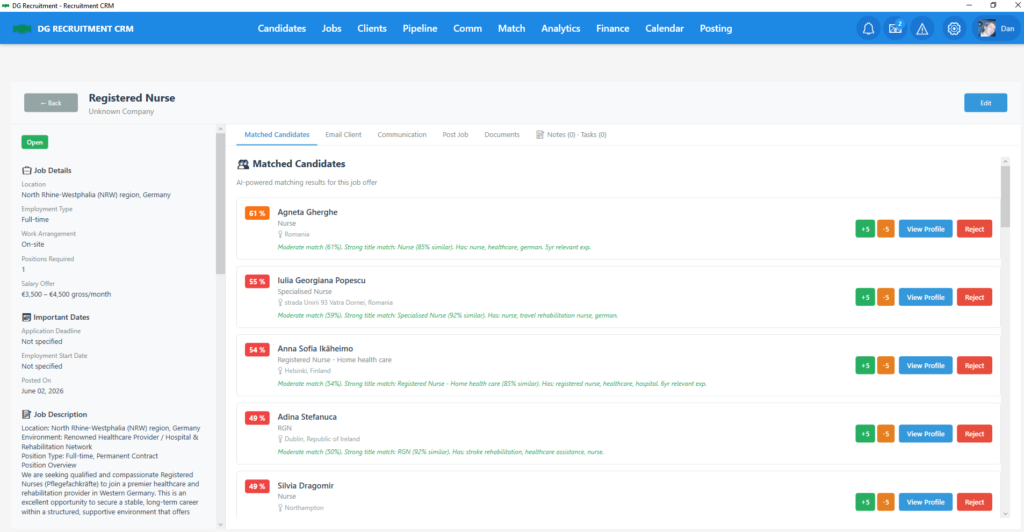
Each client and job offer has its own place in the CRM, with all communications ready, Job Offers with matched candidates.
Job offer
The job offer is naturally connected to a client and has a corresponding pipeline of candidates.
When I am looking at a job offer, I can see on the same screen the job offer, the candidates matched, the communications with the respective client, and obviously I can work with any of these.
Pipeline
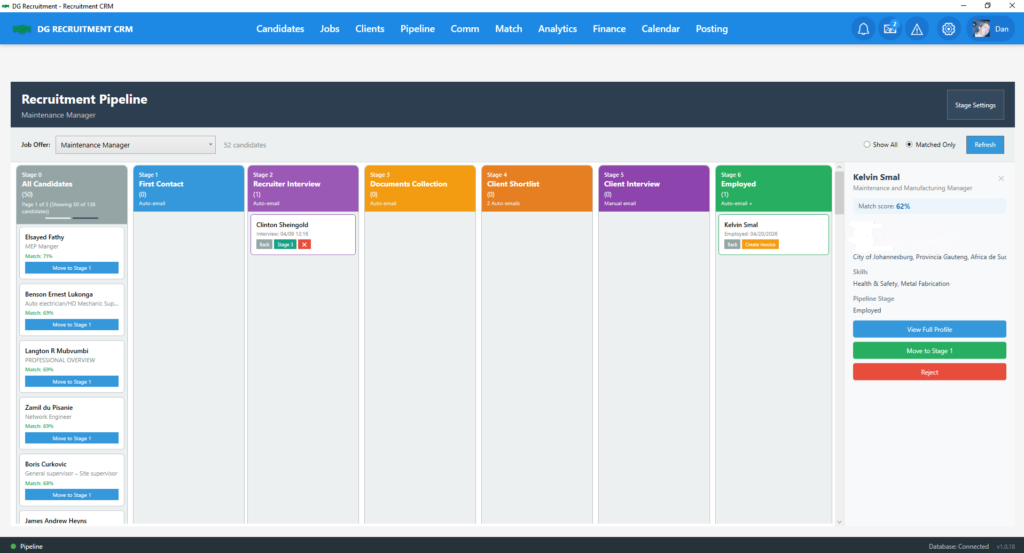
It is structured in 7 stages, from stage 0 to stage 6, where:
Stage 0 is the place where the candidates are matched by the CRM. I can review them one by one and see which is a real fit.
Stage 1 is where I place the candidates considered to be a real fit. Usually, the program is doing a good matching job, but as I know from experience that some poor CVs might hide good candidates, I have to be alert. Placing a candidate in Stage 1 is not possible unless I type a candidate review in the candidate profile. That is to make sure I manually review each candidate. Moving a candidate into Stage 1 automatically sends an email to the candidate with parts from the job offer (main parts) asking if they are willing to apply, and it also automatically creates follow-up reminder notes.
Stage 2 is where I invite the candidate to book a meeting with me, sending them the booking link, to discuss the offer. The email is automatically sent again, with automated tasks/reminders/notes.
Stage 3 is for document collection, but…again, placing a candidate here is conditioned by an interview review typed by me in the candidate profile… no review, no move. Another automated email is triggered with a list of document requests, and the usual tasks/reminders/notes.
Stage 4 is for the shortlisted candidates to be sent to the client. All the documents, CV the candidate’s sent documents are attached automatically to this email. Another recruiter’s review of the written documents is needed, and moving a candidate here will send an email to the candidate saying that he is in front of the employer, triggering another automated email creation for the employer, where all the previous notes I placed in the candidate profile + CV + documents to create a candidate profile email, as I said, with everything attached.
Stage 5 is when the candidate and client have already agreed to an online interview schedule; no email automations, as everything usually after a back and forth between me, the candidate, client… just task/reminder/notes automations.
Stage 6 is for successful placements, so all candidates successfully placed are here, with the possibility to create and send the invoice to the client.
Candidates system
As a Solo Recruiter, I know that candidates are an extremely sensitive part of my work.
Everything depends on:
- recruiter’s ability to find and keep good candidates
- keeping the candidates database active
- communications with candidates
- placing them as fast as possible in the job offer they need
That’s why I built in the CRM a lot of features for them in the CRM.
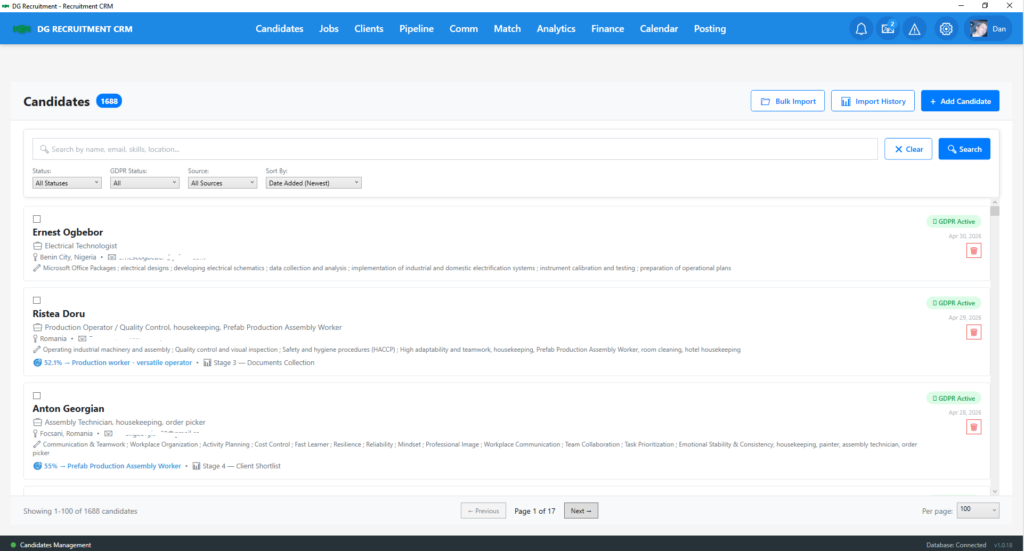
The first step is to find candidates, so I have the following candidate sourcing methods:
Jobs Posting
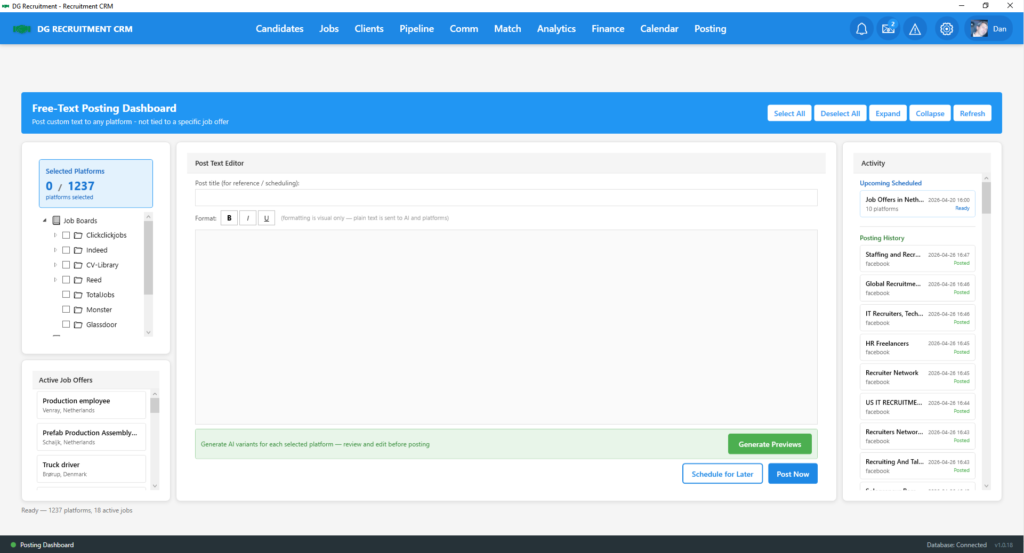
This is a semi-automated feature that helps me schedule and post job offers on various job boards and social media channels.
It works from many points in the CRM.
I can schedule a job post or post a job offer directly from the job offer, or from the dedicated Posting button in the main menu.
Browser Extension
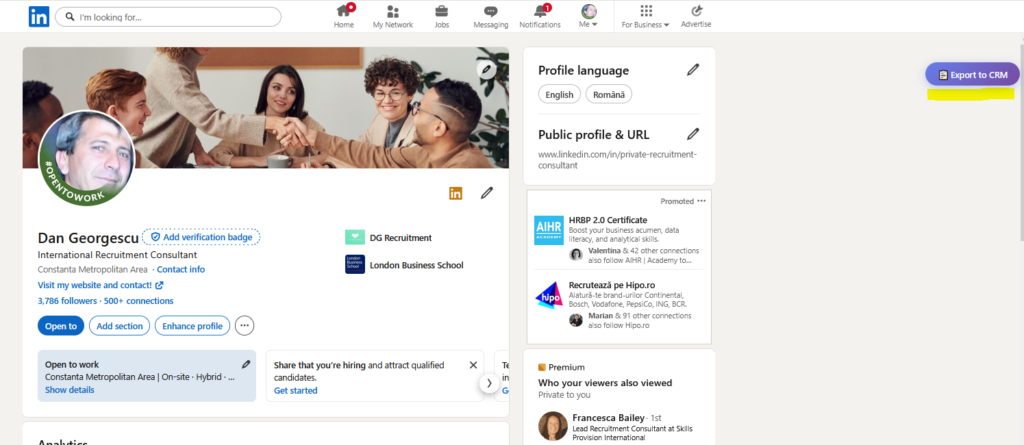
As a second source of candidates, more dedicated to the head-hunting method, I built a browser extension that actually imports a profile from LinkedIn directly into the CRM.
While this does not automatically search for candidates matching a certain job offer, I prefer to do it manually. I tried LinkedIn tools for that, but I don’t trust them. This is very helpful, as once you have established, or tried to establish, a connection with a potential candidate, everything gets recorded in the CRM.
And after that, I use my website as another source of candidates.
Having candidates is not all… they have to be organised, matched, and advanced through the above-specified pipeline.
CV Parsing
And here we are to the CV parsing part.
I built into the CRM 2 main methods of CV parsing:
Bulk CV parsing, with the possibility of parsing multiple CVs from various places on the computer;
Automated CV parsing, which means there is a folder monitored by the CRM where I save the CVs coming from various sources. I just download the CV there; the rest is the program’s job to find it,, parse it and build the candidate profile.
When a CV is parsed, the program extracts data from the respective CV and places it in a Candidate Profile.
Candidate Profile
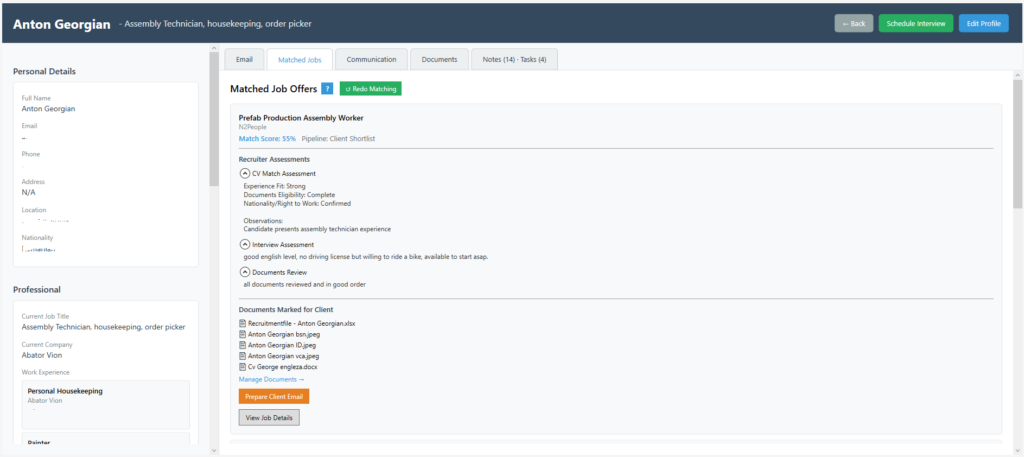
This is where I built it as the central data and communication for the respective candidate, so in a Candidate Profile can find:
- candidate data from the CVand the CV
- matched jobs for the respective candidate
- email communications for the respective candidate
- all other communications for the respectivecandidate (Phone, WhatsApp, SMS)
- all tasks and notes for the respective candidate
- candidate scoring system (we will talk about it a bit later, is connected to the candidates database auto-updatesystem) with current status of the candidate
- candidate stage in the pipeline
- all the candidate’sdocuments, with the mark “to be sent to employer”; this mark can be removed if needed, for certain documents
Basically, from the candidate profile, I can do everything related to the candidate.
So, from the Solo Recruiter entire workflow, as I see it, we have until now found a client, got a job offer, posted the job offer, gathered candidates, and organised them into profiles.
The next logical step would be to match the candidates with the job offers.
Matching System
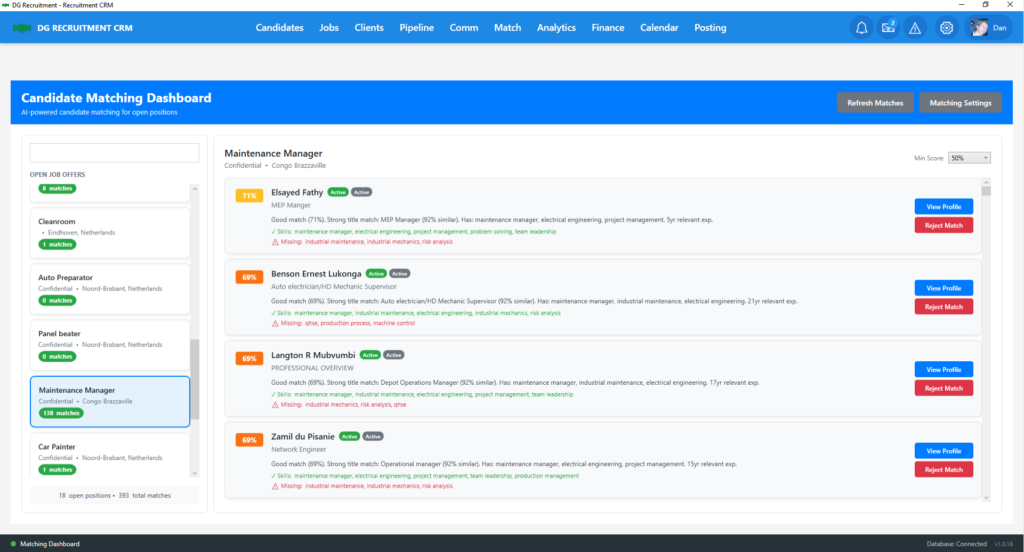
As I built the program to use it for a very long time, I made it work for a database of over 20k candidates, with multiple simultaneous clients and job offers. This means manually finding and matching candidates is definitely excluded as practically impossible.
I needed something free, fast, reliable, and not depending on anything outside of my computer.
After long hours of brainstorming and searching, I managed to find a solution, relatively simple, configurable as needed, entirely computer-based.
And so the current Matching System, which matches a candidate as soon as the profile is created, automatically, to an existing job offer.
After matching, it is automatically placed in Stage 0 in the respective pipeline, and from there, you already know the flow.
And now you will probably think that this will close the recruiter workflow… with the additional invoicing system and recruiter activity analytics, you may think that everything is covered…
There is still one thing remaining untouched yet… Knowledge… Recruiters need to always be updated with everything moving in the world related to hiring, expectations, needs, immigration, etc…
Market Intelligence System
So I created the Market Intelligence System.
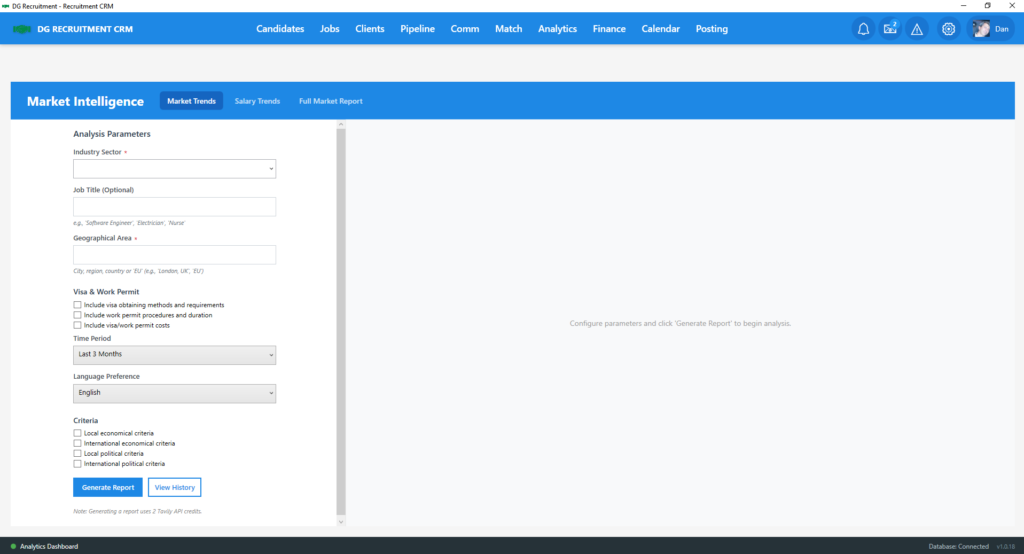
This system provides on-demand Market Reports for configurable industries, areas, countries, and job titles in seconds.
The report can be saved and downloaded as a PDF file.
Now, does the circle look closed?
Not yet… we still have one headache to solve:
the increasing candidates database.
When a candidates database is increasing, it becomes either just as a large folder with no updates or just a number to talk about, if the database is not kept “active”.
Candidates Database Autoupdate System
So, I managed to build a Candidates Database Autoupdate System.
What this system practically does is:
- gives a score to each candidate based on the candidate’s activity in the CRM, where everything counts. Emails received, replied to, advancement in the pipeline,phone, WhatsApp, SMS notes- everything is building a score.
- A large database can have candidates not been contacted in months… obviously, the candidate will not wait for me to find a job, but will work with other recruiters too and will find a job. Not contacting the candidate for months might be considered OK, but after a period, this system is practically sending an automated email to these candidates asking them if they still want to be kept… and here comes the database updating.
- Everything is done automatically. I don’t have to remember to do this. Just after some time, I will see in the candidates list some of them marked as “passive”, “inactive” or “To Be deleted”…everything I have to do is to select all which have to be deleted and delete them in bulk. Of course, I can see each of them before, change the status if I have some not-recorded communication, etc.
Does this close the entire workflow of a Solo Recruiter?
We can add to this the CRM Calendar, with the possibility to schedule meetings and send a meeting link, the full Email Campaign system, which will deliver clients…
I’ve been working on this since October 2025.
Is this something you would use?
Do you think I want to sell it? Think again… It’s built around my own perception of the recruiter workflow, not as a generally available workflow (or at least I didn’t think it this way… ).
If this is your workflow as well, and you are still paying monthly bills to some CRM services, would you exchange for this, with absolutely nothing to pay monthly?
I know the program is not perfect; for this reason, I’m trying to find fellow Solo Recruiters from anywhere in the world willing to install the program on their computer and try it, test it, work with it, and let me know if there is anything I can improve, needs to be changed or whatever…
If, after a month, you would like the program, you can keep it…
You can get your copy after you insert your name and email here.
https://dgrecruitment.services/free-recruitment-crm-software/
Why did I make the download and licensing system?
First, I need to know who is installing the program, so we can keep in touch for anything. So I need your email address and name.
Second, I made the download link valid for 48 hours only, as I need to be sure you have definitely decided to try it. If you registered, received the email, but did not download the program, then you have not decided to try it. Maybe it just looks like “too good to be true” for you, waiting to see the “hooks,” “upselling” or whatever other marketing techniques you’ve seen before.
Remember… I am a Solo Recruiter… not a software marketer…
Third, after so many months of work, honestly I do not want this program to reach some hackers to be replicated and then sell it in a high-powered marketing campaign… It’s my work, and the only destination should be solo recruiters who really need it…
That’s it!
I know… it might look “fishy”, or “too good to be true”…
But…
What if I am offering you the opportunity to see the program working live in my computer? Would you like to see it?
If so, just use the button below to book a demo according to your availability!
Is simple, always free, and hopefully will help you to understand better!
